Make vs n8n: credits, executions and hosting
A 10,000-credit allowance and a 10,000-execution allowance do not buy the same unit of work. Count the records flowing through your automation before comparing the plans.
ToolGlance source review . Documentation and calculated examples; not a hands-on vendor benchmark.
Workflow workload calculator
Scenario: one trigger returns a batch of records; every record goes through the same ordinary non-AI actions. The entire batch stays inside one n8n production workflow. In Make, every module used here has the standard one-credit rate.
Calculated example, not measured usage.
100 runs x (1 trigger + 10 items x 3 actions) = 3,100 Make credits. 100 runs = 100 n8n executions.
Different units, not a 31-fold price or performance comparison. Monthly runs include the checks you actually schedule, even when a run returns zero items. This model excludes AI, retries, subworkflows, aggregation, branching, special-rate modules and additional checks outside the entered run count. Free Community self-hosting does not turn this execution count into a paid-plan invoice.
Counting rules: Make: operations and bundles Make: fixed and dynamic credits n8n: execution-based pricing and FAQ.
Why a batch changes the comparison
A document workflow might create a file, download it and email it for each incoming response. With ten responses, that is thirty downstream actions, plus one trigger operation in the Make example. Keeping those records in one n8n run still counts as one execution. Splitting them into ten independent workflow starts is a different design, not a free equivalent.
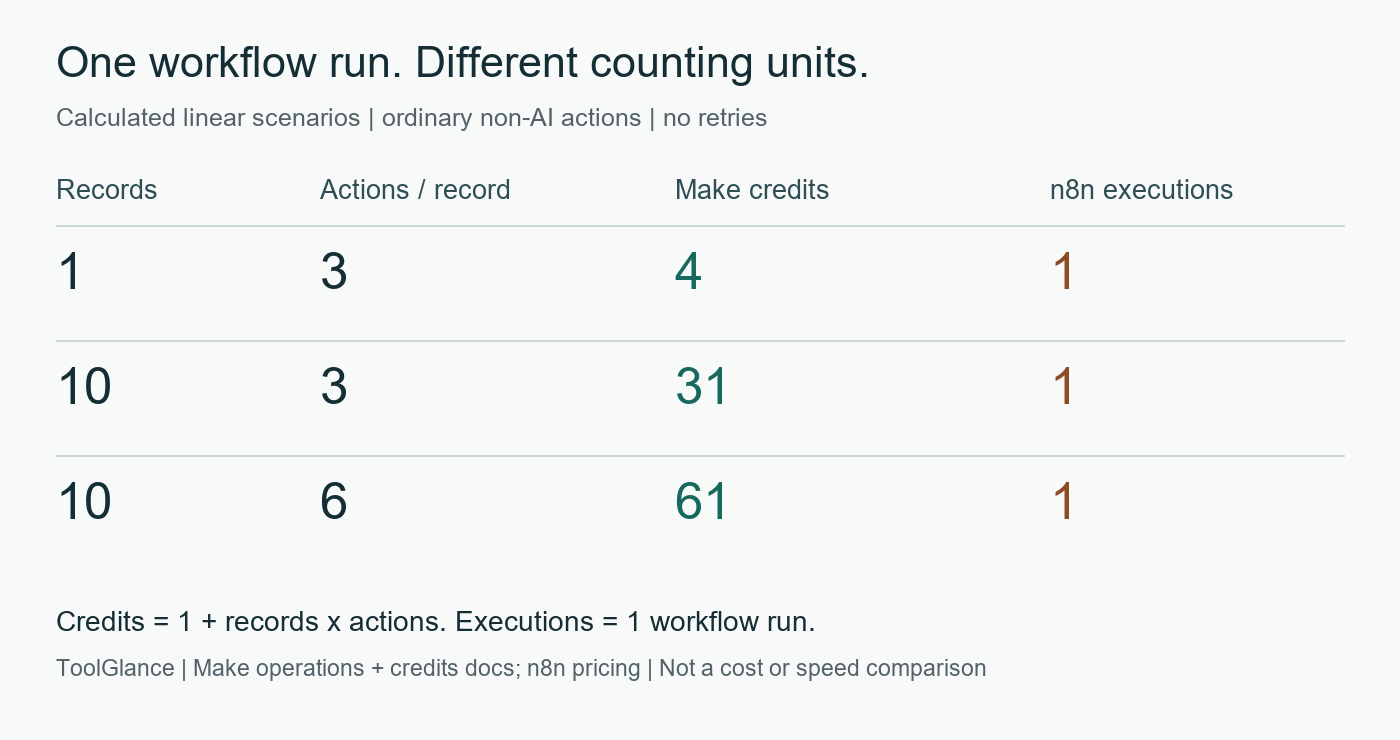
Adding an aggregator, a branch or a module with a special rate changes the arithmetic. Use the actual module history when a real workflow differs from the linear scenario. Make: operations and bundles Make: fixed and dynamic credits
Requirements that the counter cannot decide
| Decision | Make | n8n | Primary sources |
|---|---|---|---|
| What is the main counting unit? | Credits. Standard non-AI modules usually consume one credit per operation; an operation is one module run. | Paid plans count production workflow executions, rather than each step within the workflow. | Make: fixed and dynamic credits Make: operations and bundles n8n: execution-based pricing and FAQ |
| What happens when a trigger returns ten records? | One trigger operation, then one operation for each record processed by each downstream action in the simple linear model below. | Items handled inside one workflow run do not each become a separate execution. Starting separate workflows changes this assumption. | Make: operations and bundles n8n: execution-based pricing and FAQ |
| Does a credit cover every AI expense? | No. AI connection type can introduce token-based or other charges. Your own provider connection can also have a separate provider bill. | Execution allowance is not a promise of included third-party model tokens. Budget provider usage separately from the workflow count. | Make: fixed and dynamic credits n8n: execution-based pricing and FAQ |
| Who operates a self-hosted n8n instance? | This review does not establish a self-hosted Make equivalent. Confirm hosting and data-handling requirements directly with Make. | n8n documents deployment on your own infrastructure. Assign infrastructure, backup, update and incident ownership before choosing that route. | n8n: self-hosting options |
| Does free Community include team governance? | Plan-specific access controls need a separate requirements check; no feature-parity claim is made here. | Community excludes, among other features, SSO, projects, workflow/credential sharing and Git version control. Some paid editions provide them; check the exact plan. | n8n: Community and paid editions |
| Is source-available the same as unrestricted open source? | Not assessed as an open-source deployment option in this review. | No. n8n describes its license as fair-code and source-available, not OSI open source. Selling hosted access or embedding customer credentials needs a license review. | n8n: Sustainable Use License FAQ |
No current Make price has been transcribed into this comparison. Use Make pricing and n8n pricing for the selected allowance, billing period, currency and taxes. A larger unit count is not evidence of a larger bill.
Five checks before moving a workflow
- Draw the execution boundary. Record what starts the workflow, how often it starts and how many items remain inside each run.
- Inspect a small successful batch. Save the run ID, input item count, completed actions and vendor usage-counter change. The worksheet starts blank because no account measurement was made for this page.
- Check an empty batch and a controlled failure. Observe polling, retries and duplicate side effects separately. Those behaviors are not scored by this calculator.
- List every additional meter. AI-provider tokens, storage, infrastructure and special-rate modules belong alongside the automation allowance.
- Validate operating requirements. Who owns credentials, releases and incidents? Which plan supplies the required sharing, SSO and audit features? Confirm licensing for customer-facing deployments.
Blank verification worksheet CSV. Record observations from your own accounts; do not treat the calculated examples as completed tests.
Questions about Make vs n8n
Are Make credits and n8n executions equivalent?
No. A Make credit is a billing unit attached to operations or other usage. An n8n execution covers a workflow run. Equal allowance numbers therefore do not describe equal workloads.
Is n8n always cheaper for a long workflow?
The unit counts alone cannot establish that. Compare the applicable plans, currency, billing period, provider charges, infrastructure and operating effort for the same workload.
Does this calculator include AI agents, retries or subworkflows?
No. It models one trigger and a fixed number of ordinary non-AI actions per returned item, all within one production workflow. Branches, aggregation, retries, separate workflows and AI charges are excluded.
Were these numbers measured in Make and n8n accounts?
No. They are calculated examples based on the linked vendor documentation. The verification worksheet records the evidence needed to compare the model with your own execution history.
Sources and reuse
- Make: operations and bundles
- Make: fixed and dynamic credits
- n8n: execution-based pricing and FAQ
- n8n: self-hosting options
- n8n: Community and paid editions
- n8n: Sustainable Use License FAQ
Source map and review date (JSON). Cite this comparison for the explicit counting model and example dataset, not as evidence that one platform is cheaper or more reliable. No overall winner or measured accuracy score is assigned.